Showing posts with label Huawei. Show all posts
Showing posts with label Huawei. Show all posts
Wednesday, November 28, 2012
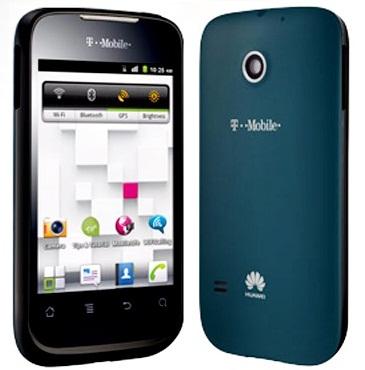
Huawei Summit Manual User Guide
Huawei Summit Manual User Guide and Operating Instruction - To transfer all your favorite music and pictures from your PC to your mobile phone’s microSD card, set the microSD card as USB mass storage. > Connect your mobile phone to your PC with the USB cable. Your PC will detect the microSD card as a removable disk.> Open the notification bar, and then touch USB connected > Touch Turn on USB storagein the dialog box that opens to confirm that you want to transfer files and now You can transfer files from your PC to your mobile phone’s microSD card.
Connecting to a Wireless Network Huawei Summit :
- After turning on Wi-Fi, touch Apps -> Settings.
- Touch Wireless & networks -> Wi-Fi settings. You will see a list of detected Wi-Fi networks in the Wi-Fi networks section.
- Touch a Wi-Fi network to connect to it.
If you select an open network, you will be automatically connected to the network.If you select a network that is secured with Wired Equivalent Privacy (WEP) and connect to it for the first time, enter the password, and then touch Connect. If you connect to a secured wireless network that you have already used, you will not be prompted to enter the password again unless you reset your mobile phone to its default settings.On the Wi-Fi settings screen, touch Add Wi-Fi networkto add a new Wi-Fi network.
This Huawei Summit manual / user guide is available in English. For new owner of Huawei Summit mobile phone, you may need this user guide to improve your experiences while using this smartphone. This Huawei Summit user manual comes in PDF file format with 7.21 MB in size (47 pages). Improvements and changes to this Huawei Summit user manual necessitated by typographical errors, inaccuracies of current information, or improvements to programs and/or equipment, may be made by T-Mobile at any time and without notice. The information collected in this process is not associated with a specific personal identity.
To know more about complete quick operating guide of Huawei Summit, you can download this Huawei Summit user manual below.
Download T-Mobile Huawei Summit User Guide.PDF (7.21 MB)

Sunday, November 11, 2012
Huawei Ascend P1 quick manual/user guide
Huawei Ascend P1 quick manual/user guide Download Pdf Instruction Support Setting Troubleshooting - Now Huawei Ascend P1 available user manual / guide for you download link from Huawei below, before you download, read a little review Huawei Ascend P1.
Huawei Ascend P1 is a smartphone with Android 4.0 ICS which has a thickness of only 7.7 millimeters making it one of the slimmest smartphones today. In it there are processor 1.5 GHz dual-core TI OMAP 4460 chip with dual-core Cortex-A9, SGX540 GPU, 1GB RAM, 4.3-inch Super AMOLED display with qHD resolution of 960x540 pixels and is coated with Gorilla Glass, and 8MP camera with back-illuminated sensor

Huawei Ascend P1 Specifications:
- OS Android OS, v4.0 (Ice Cream Sandwich)
- CPU Dual-core 1.5 GHz Cortext-A9
- PowerVR SGX540 GPU
- Weight 110 g
Screen
- Super AMOLED capacitive touchscreen,
- Corning Gorilla Glass 16M colors,
- 540 x 960 pixels, 4.3 inches (~ 256 ppi pixel density)
Memory
- Card slot microSD, up to 32 GB
- Internal 1 GB of RAM, 4 GB ROM
Camera
- 8 MP Rear
- 1.3 MP front
- Battery Standard battery, Li-Ion 1670 mAh
Here you are the User Guide PDF Manual Copy / for Huawei Ascend P1 directly from Huawei official website. Huawei Ascend P1 user guide in English or You can choose another language, Download from the Links below
[Download Huawei Ascend P1 quick manual/user guide]
Saturday, November 10, 2012
Huawei Honor 2 quick manual/user guide & Full Spec
Huawei Honor 2 quick manual/user guide Download Pdf Instruction Support Setting Troubleshooting - Huawei Honor 2 Not now available user manual/guide you can visit here for mobile release, read a little review and Full spec Huawei Honor 2 below.
Huawei Honor 2 is going to slide a low price but spesiifikasi monster. With a tag of around 300 USD smartphone will offer a 4.5-inch LCD IPS display HD resolution. Also, the possibility of 1 GB / 2 GB of RAM, which will be combined with K3V2 processor quad-core 1.4 GHz. Then there is the internal memory of 8 GB, 8 MP camera and Android OS 4.0 Ice Cream Sandwich.

If it is true then it would be able to hit the Huawei Android smartphone market. And, of course, would be interesting to have mobile phones
Huawei Honor, which first launched more than a year ago was not so compelling, but it did not make the handset manufacturer's Bamboo Curtain country, they finally mengahdirkan successor named Huawei Honor 2, the specifications, powefrul Honor 2 much more than the first version, it cost me? certainly more affordable than other phones with the same features.
=======================================================================
Huawei Honor 2 Full Spec :
GENERAL
Network 2G : GSM 850 / 900 / 1800 / 1900
3G : HSDPA 850 / 900 / 1700 / 1900 / 2100
Announced 2012, 4Q
Processor
SAR Rating
COLOR
Available Black, White
SIZE
Dimensions (mm) 134 x 67.5 x 10.5
Weight (g) 145
DISPLAY
Type IPS LCD capacitive touchscreen, 16M colors
Size 720 x 1280 pixels, 4.5 inches (326 ppi pixel density)
Lines 0
Menu Touchscreen
DESIGN
Type Candybar
Antenna Fixed Internal
KEYS Navigation Touchscreen : multitouch
QWERTY No
Soft
Other
Lighting
MEMORY
Phonebook
Internal (MB) 8 GB, 2 GB RAM
Expansion microSD, up to 32 GB
BATTERY
Type Standard battery, Li-Ion 2230 mAh
Stand-by (hrs) Up to 223 hours
TalkTime(min) Up to 780minutes
RINGTONES
Polyphonic
Customization Yes
AUDIO
Format MP3/WAV/eAAC+
MP3 Player Yes
Voice
FM Radio Yes
A2DP Yes
VIDEO
Format MP4/H.263/H.264
Recorder Yes, 1080p@30fps
TV Null
ENTERTAINMENT
Games Yes, Downloadable
MESSAGING
SMS Yes
Total SMS
MMS No
EMS Yes
Email Yes
IM
Push-To-Talk
CONNECTIVITY
HSDPA Yes, HSDPA, 21.1 Mbps; HSUPA, 5.76 Mbps
EDGE Yes
Bluetooth Yes, v3.0 with A2DP
3G Yes
GPRS Yes
Infrared (IrDA) No
USB Port Yes
WIFI/WLAN Yes, Wi-Fi 802.11 b/g/n, DLNA, Wi-Fi hotspot
Data Cable Yes
Data Modem
GPS Yes
SOFTWARE
Java (J2ME) No
WAP No Info
Platform OS Android OS - v4.0 Ice Cream Sandwich
Browser xHTML, HTML
Predictive Text Entry
Speech Codes
PIM Application
Others Application Google Apps
PERSONAL
Themes Yes
Caller ID Yes
Profile ID Yes
CAMERA
Lens Type CMOS, 8.0 Megapixel
Digital zoom
Max. Resolution 3264x2448 pixels
Flash Yes
Night Mode No
Multi Shot
Frame Types
Extra Features Autofocus, Geo-tagging, touch focus, face detection, HDR
Photo Format JPG
Front Camera Yes, 1.3 MP, 720p@30fps
=======================================================================
Huawei Honor 2 quick manual/user guide :
The Huawei Honor 2 User manual or user guide is not yet available online for this time, it will be available here after the phone released to the market. back here later for check avaliable the user guide availability. Thank's you
Subscribe to:
Posts (Atom)