Showing posts with label iPhone. Show all posts
Showing posts with label iPhone. Show all posts
Sunday, November 11, 2012
Apple iPhone 5S Release Date, Full Spec & Manual Guide
Apple iPhone 5S Release Date, Full Spec & Manual Guide - Apple previously had to change the annual cycle, specifically for the iPad. In 2010 and 2011, Apple has released the iPad generation annually. But in 2012, Apple released the iPad 3 series at once (New iPad, iPad Mini, and iPad). Rumors about Apple iPhone 5S will be launched in June 2013.
according to Misek predicted, most likely the iPhone 5S will adopt colorful style as used in the iPod Touch devices. Later, there will be 6 to 8 color choices for this seventh-generation iPhone.
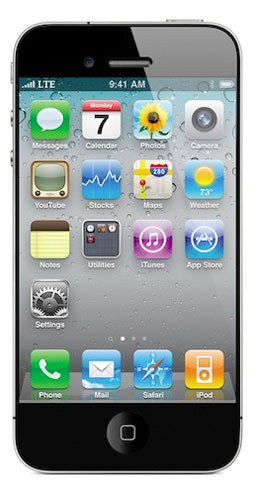
Misek does not give details about what it means to screen Super HD. Chances are, the screen on Apple's new smart phone will support 720p or 1080p resolution.
Misek also made a prediction about when the iPhone 5S will be present in the market. Typically, a new generation of Apple's products will be launched once a year. Apple is expected to change the annual cycle 1 to 6 months and will launch the iPhone 5S in June 2013.
=======================================================================
Apple iPhone 5S Full Spec :
=======================================================================
Generals
Date Announced December 10, 2012 (4th Quarter)
Status Coming Soon
Network Technology GSM 850 / 900 / 1800 / 1900 - GSM A1428
CDMA2000 1xEV-DO - CDMA A1429
TE 700 / 850 / 1800 / 19
Processor/ Memory
CPU -
RAM 1 GB
Internal Storage -
External Memory -
GPU PowerVR SGX 543MP3
Chipset Apple A6
Body
Dimensions (mm) -
Weight (g) -
Available colours -
QWERTY Keypad No
Display
Screen Size, Resolution -
Screen Color -
Design Candybar
Screen Protection Corning Gorilla Glass 2, Oleophobic coating
Multitouch Yes
Software
Platform / OS Apple iOS 6
Java (J2ME) No
Messaging SMS, MMS, Push Email, IM, RSS
Others Twitter and Facebook integration,TV-out - Maps,iBooks PDF reade,Audio/video player/editor
Sound
Alert -
3.5mm Jack Yes
Extra Feature -
Battery
Battery Type/Capacity Li-Po 1440 mAh (5.45 Wh)
Stand-by -
TalkTime -
Entertainment
FM Radio No
TV Receiver No
Others -
Connectivity
HSPDA DC-HSDPA, 42 Mbps; HSDPA, 21 Mbps; HSUPA, 5.76 Mbps, LTE, 100 Mbps; EV-DO Rev. A, up to 3.1 Mbps
WLAN Yes
EDGE Yes
GPRS Yes
WiFi Hot Spot Yes
GPS Yes
NFC Support No
Bluetooth Wi-Fi 802.11 a/b/g/n, dual-band, Wi-Fi hotspot
USB Port No
Sensor Accelerometer, Compass, Gyro, Proximity
Camera Specifications
Capacity 8 Megapixel
Max. Resolution 3264x2448
Flash Yes
Video Recording -
Secondary Camera No
Extra Features -
Disclaimer :
The Apple iPhone 5S specifications is just for reference only.We can not guarantee that the information on this page is 100% correct.
=======================================================================
Date Announced December 10, 2012 (4th Quarter)
Status Coming Soon
Network Technology GSM 850 / 900 / 1800 / 1900 - GSM A1428
CDMA2000 1xEV-DO - CDMA A1429
TE 700 / 850 / 1800 / 19
Processor/ Memory
CPU -
RAM 1 GB
Internal Storage -
External Memory -
GPU PowerVR SGX 543MP3
Chipset Apple A6
Body
Dimensions (mm) -
Weight (g) -
Available colours -
QWERTY Keypad No
Display
Screen Size, Resolution -
Screen Color -
Design Candybar
Screen Protection Corning Gorilla Glass 2, Oleophobic coating
Multitouch Yes
Software
Platform / OS Apple iOS 6
Java (J2ME) No
Messaging SMS, MMS, Push Email, IM, RSS
Others Twitter and Facebook integration,TV-out - Maps,iBooks PDF reade,Audio/video player/editor
Sound
Alert -
3.5mm Jack Yes
Extra Feature -
Battery
Battery Type/Capacity Li-Po 1440 mAh (5.45 Wh)
Stand-by -
TalkTime -
Entertainment
FM Radio No
TV Receiver No
Others -
Connectivity
HSPDA DC-HSDPA, 42 Mbps; HSDPA, 21 Mbps; HSUPA, 5.76 Mbps, LTE, 100 Mbps; EV-DO Rev. A, up to 3.1 Mbps
WLAN Yes
EDGE Yes
GPRS Yes
WiFi Hot Spot Yes
GPS Yes
NFC Support No
Bluetooth Wi-Fi 802.11 a/b/g/n, dual-band, Wi-Fi hotspot
USB Port No
Sensor Accelerometer, Compass, Gyro, Proximity
Camera Specifications
Capacity 8 Megapixel
Max. Resolution 3264x2448
Flash Yes
Video Recording -
Secondary Camera No
Extra Features -
Disclaimer :
The Apple iPhone 5S specifications is just for reference only.We can not guarantee that the information on this page is 100% correct.
=======================================================================
Download Apple iPhone 5S User Manual Guide :
The Apple iPhone 5S User manual or user guide is not yet available online for this time, it will be available here after the phone released to the market. back here later for check avaliable the user guide availability. Thank's You

Friday, November 9, 2012
Apple iPhone 4s quick manual/user guide
Apple iPhone 4s quick manual/user guide Download Pdf Instruction Support Setting Troubleshooting - Now Apple iPhone 4s available user manual / guide for you download link from Apple below, before you download, read a little review Apple iPhone 4s.
iPhone 4S has the same design of the iPhone 4, but comes with a more powerful specification. iPhone 4S is powered by Apple A5 chipset with support for dual-core Cortex A9 processor and GPU 1GHz owerVR SGX543MP2.
iPhone 4S is a world phone, which the iPhone 4S can run on both GSM and CDMA networks, so it can be used almost in all the countries.

Apple iPhone 4S comes with an 8 megapixel camera with 1080p HD video recording capabilities dengsn features of real time noise reduction and video stabilization.
Apple iPhone 4S comes in two color variants namely black and white and will be available in three memory options ie 16GB, 32GB and 64GB.
This is one of the tips in the guide, and his next can be downloaded at the link below
this way for connecting iPhone to pc/lapttop ?
You may need to connect iPhone to your computer in order to complete activation. Connecting iPhone to your computer also lets you sync information, music, and other content with iTunes. See Syncing with iTunes on page 16. Connect iPhone to your computer: Use the Lightning to USB Cable (iPhone 5) or Dock Connector to USB Cable (earlier iPhone models) provided with iPhone
How to Connecting to the Internet ?
iPhone connects to the Internet whenever necessary, using a Wi-Fi connection (if available) or your carrier’s cellular network. For information about connecting to a Wi-Fi network, see Wi-Fi on page 130.
Note: If a Wi-Fi connection to the Internet isn’t available, some iPhone apps and services may transfer data over your carrier’s cellular network, which may result in additional fees. Contact your carrier for information about your cellular data plan rates. To manage cellular data usage, see Cellular on page 135.
How To Deleting apps?
Delete an App Store app: Touch and hold its icon on the Home screen until the icon starts to jiggle, then tap. You can’t delete built-in apps. When you finish, press the Home button .Deleting an app also deletes all of its data. You can re-download any app you’ve purchased from the App Store, free of charge. For information about erasing all of your apps, data, and settings, see Reset on page 138.
For More Information, you can download user manual guide below.
Here you are the User Guide PDF Manual Copy / for Apple iPhone 4s directly from Apple official website. Apple iPhone 4s user guide in English, Download from the Links below
[Download Apple iPhone 4s quick manual/user guide].
Wednesday, November 7, 2012
Apple IPhone 5 quick manual/user guide
Apple IPhone 5 quick manual/user guide Download Pdf Instruction Setting - Now Apple IPhone 5 available user manual / guide for you download link from Apple below, before you download, read a little review Apple IPhone 5.
iPhone 5 is a smartphone from Apple which began to be introduced in September 2012. Some of the key features of the iPhone 5 is as follows: 4 inch touch screen, screen resolution of 640 x 1136 pixels, autofocus main camera 8 MP with LED flash, 1.2 MP secondary camera resolution, iOS 6 operating system, SIM card nano [nano-SIM size smaller than the microSIM that had been used many other smartphones] and 4G network support.

After the success of the iPhone 4, the new giant company Apple recently launched a new series that was held at the Yerba Buena Center, California, USA. iPhone 5 is already equipped with the latest 4G technology LTE (Long Term Evolution) and of course, already supports 3G, HSDPA, dual band WiFi and Bluetooth. Besides Apple's iPhone 5 has a large screen that is larger than 4 inches with a resolution of 1136 x 480 pixels with 326 ppi pixel density reaches (pixels per inch). while in terms of the thickness of only 7.6 mm and weighs 112 grams, and equipped to sustain performance processor system on chip (SoC) A6, the mobile operating system iOS version 6.
This is one of the tips in the guide, and his next can be downloaded at the link below
Setting up and activating iPhone
To set up and activate iPhone, turn on iPhone and follow the Setup Assistant. The Setup Assistant steps you through the setup process, including connecting to a Wi-Fi network, signing in with or creating a free Apple ID, setting up iCloud, turning on recommended features such as Location Services and Find My iPhone, and activating iPhone with your carrier. You can also restore from an iCloud or iTunes backup during setup.
Activation can be done over a Wi-Fi network or, with iPhone 4S or later, over your carrier’s cellular network (not available in all areas). If neither option is available, you need to connect iPhone to your computer running iTunes for activation.
Connecting iPhone to your computer
You may need to connect iPhone to your computer in order to complete activation. Connecting iPhone to your computer also lets you sync information, music, and other content with iTunes. See Syncing with iTunes on page 16.
Connect iPhone to your computer: Use the Lightning to USB Cable (iPhone 5) or Dock
Connector to USB Cable (earlier iPhone models) provided with iPhone.
Here you are the User Guide PDF Manual Copy / for Apple IPhone 5 directly from Apple official website. Apple IPhone 5 user guide in English, Download from the Links below
Thursday, November 1, 2012
Apple iPad Mini quick manual/user guide
iPad Mini User Guide Download - iPad 4 for iOS 6 Software - Apple iPad 4, iPad mini User Guide PDF - Here you are the User Guide PDF Manual Copy / for iPad 4 for iOS 6 Software iPad Mini directly from apple official website. iPad Mini user guide in English, Download from the Links below.
Volume button and Side Switch
Use the Side Switch to disable audio alerts and notifications. You can also use it to lock the screen rotation and prevent the iPad display from switching between portrait and landscape mode.
Adjust the volume: Press the Volume button up or down to increase or decrease the volume. Mute the sound: Press and hold the bottom end of the Volume button.
Lock the screen rotation: Go to Settings > General > “Use Side Switch to...,” then tap Lock Rotation.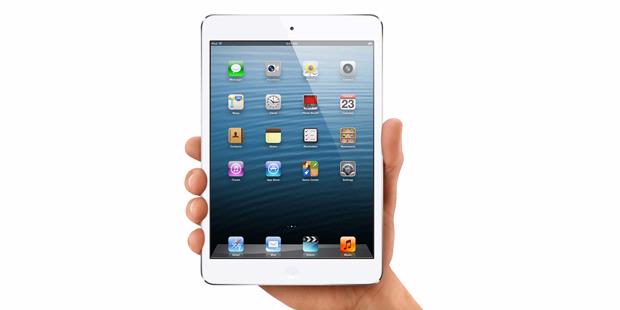
iPad mini Specifications: iPad mini runs on dual-core 1GHz Cortex-A9 with 512MB RAM and Apple A5 chipset; and for the iPad 4 uses dual core with 2GB RAM Apple A6X chipset. All of them has optional 16GB / 32GB / 64GB internal storage. There is no additional external memory card.
Along with the battery (un-removable) the iPad mini has 312 grams and iPad 4 has 662 grams. iPad mini has 200 x 134.7 x 7.2 mm and iPad 4 has 241.2 x 185.7 x 9.4 mm in its dimension size.
Use the Side Switch to disable audio alerts and notifications. You can also use it to lock the screen rotation and prevent the iPad display from switching between portrait and landscape mode.
Adjust the volume: Press the Volume button up or down to increase or decrease the volume. Mute the sound: Press and hold the bottom end of the Volume button.
- Set a volume limit: Go to Settings > Music > Volume Limit.
- Mute notifications, alerts, and sound effects: Slide the Side Switch down.
Lock the screen rotation: Go to Settings > General > “Use Side Switch to...,” then tap Lock Rotation.
Setting up iPad :
To set up iPad, turn it on and follow the Setup Assistant. The onscreen directions in Setup Assistant step you through the setup process, including:
- Connecting to a Wi-Fi network
- Signing in with or creating a free Apple ID
- Setting up iCloud
- Turning on recommended features, such as Location Services and Find My iPad
During setup, you can copy your apps, settings, and content from another iPad by restoring from an iCloud backup or from iTunes. See Backing up iPad on page 128.
Punctuation and formatting commands include:
•quote … end quote
•new paragraph
•cap—to capitalize the next word
•caps on … caps off—to capitalize the first character of each word
•all caps—to make the next word all uppercase
•all caps on … all caps off—to make the enclosed words all uppercase
•no caps on … no caps off—to make the enclosed words all lowercase
•no space on … no space off—to run a series of words together
•smiley—to insert :-)
•frowny—to insert :-(
•winky—to insert ;-)
And here the User Guide for both of iPad 4 and iPad mini that you can download:
Download User Guide for iPad 4 and iPad mini iOS 6 | Language: English | Page: 136 | PDF Size: 14.4MB
Subscribe to:
Posts (Atom)