Showing posts with label Nokia. Show all posts
Showing posts with label Nokia. Show all posts
Friday, November 30, 2012
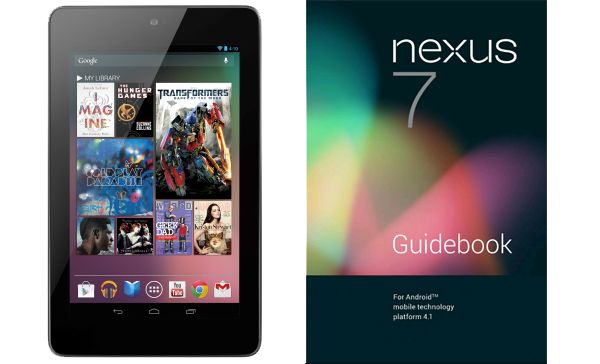
Google Nexus 7 Manual
Google Nexus 7 Manual: Download Asus Nexus Tablet User Guide - How To Turn on & sign in ? To turn on your Nexus 7, press the Power button on the right edge near the top for a few seconds, then release it.
The first time, you’ll see a Welcome screen.
- To choose a different language, touch the menu.
- To continue, touch Start and follow the instructions.
When prompted, sign in using the email address and password for your Google Account. If you don’t have one yet, go ahead and create one. An email address that you use for any of the following counts as a Google Account:
- Gmail
- YouTube
- Google Apps
- AdWords
- Any other Google product
When you sign in with a Google Account, all the email, contacts, Calendar events, and other data associated with that account are automatically synced with your tablet. if you have multiple Google Accounts, you can add the others later.
How to Charge the battery ?
The printed Quick start Guide that comes with Nexus 7 contains basic operating instructions for your new tablet. The battery may not be fully charged at first. It’s a good idea to fully charge it as soon as you can.
Connect the micro usb cable to Nexus 7 and to the charging unit, and the charging unit to a power outlet:
IMPorTAnT: use the charging unit and micro usb cable that come with your Nexus 7. other charging units and usb cables may charge more slowly or not at all
You’re in control
When you opt in to Google Now, you’re also turning on location reporting and location history. Google Now also uses location information provided by Google’s location service and GPS, if those are currently turned on. Google’s location service must be turned on for Google Now to work. Google Now also uses data from other sources, such as your data in Google products or in third-party products that you allow Google Now to access. For example, your tablet’s synced calendar may include entries from non-Google calendar products. For example, if you have a synced calendar entry for a dentist appointment that includes the dentist’s address, Google Now can check traffic and suggest when to leave. And if you have searches stored in your Web History, Google Now can also show cards based on sports scores, flight status, and so on.You’re in control. You can choose exactly which cards you’d like to see, adjust the details of what they display, and adjust your privacy settings. For more information about Google Now and your location information, see “Chapter 4, Make search personal,” on page 26. Page 26 u can download pdf below.
Download Asus Nexus Tablet User Guide pdf

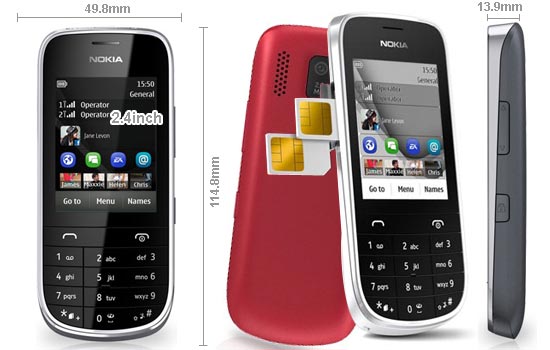
Nokia Asha 202 quick manual/user guide
Nokia Asha 202 quick manual/user guide - How to Update phone software using your PC ? Update your phone software with the Nokia Suite PC app. You can also back up the photos and other stuff in your phone to your computer. You need a compatible PC, a highspeed internet connection, and a compatible USB cable to connect your phone to the PC. To get more info and to download the app, go to www.nokia.com/support.
How to Update phone software using your phone ?
You can update your phone software wirelessly. You can also set your phone to automatically check forupdates.
You can only update your software when using the SIM in the internal SIM holder.
Select Menu > Settings and Device > Device updates.
1. To check if there is an update, select Current sw details.
2. To download and install an update, select Downl. device sw, then follow the instructions shown on the
phone.
The update may take several minutes. If you encounter problems, contact your network service provider.
Check for updates automatically ?
Select Automatic SW update, then set how often to check. Your network service provider may send updates over the air directly to your phone. For more info on this network service, contact your network service provider.
Back up content to a memory card ?
Want to make sure you won't lose any important files? You can back up your phone memory to a compatible memory card.
1. Select Menu > Settings > Sync & backup.
2. Select Create backup.
3. Select what you want to back up, then select Done.
Restore a backup
Select Restore backup
And now you can download user manual below, if you can read to full content.
Download Nokia Asha 202 User Manual Guide(pdf)
Nokia Asha 306 quick manual/user guide
Nokia Asha 306 quick manual/user guide - How Charge the battery over USB ? Battery low, but you don't have a charger with you? You can use a compatible USB cable to connect to a compatible device, such as a computer. To avoid breaking the charger connector, be careful when connecting or disconnecting the charger cable.
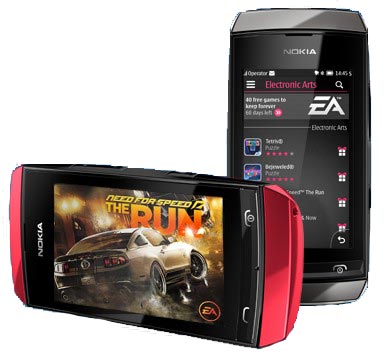
Learn how to start using your phone.
Keys and parts
1 — Earpiece
2 — Screen
3 — Call key
4 — Microphone
5 — Charger connector
6 — Micro-USB connector
7 — Headset connector (Nokia AV connector 3.5 mm)
8 — Volume up/Zoom in key
9 — Volume down/Zoom out key
10 — Lock key
11 — End/Power key
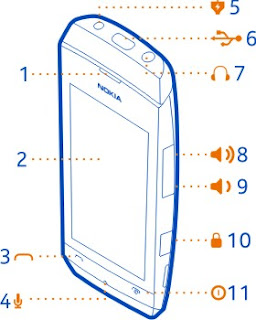
12 — Camera lens. Before using the camera, remove the protective tape from the lens.
13 — Memory card slot
14 — Loudspeaker

Insert or remove a memory card
Use only compatible microSD cards approved by Nokia for use with this device. Incompatible cards may damage the card and the device and corrupt data stored on the card.
Your phone supports memory cards with a capacity of up to 32 GB. You can insert or remove the memory card without switching the phone off.
Insert a memory card :
1 Use your fingernail to open the cover of the memory card slot.
2 Push the memory card in with the contact area face up until it locks into place.
3 Close the cover of the memory card slot.
Remove the memory card :
Important: Do not remove the memory card when an app is using it. Doing so may damage the memory card and the device and corrupt data stored on the card.
1 Open the memory card slot cover.
2 Push the card in until it's free, then pull it out.
3 Close the cover
Charge the battery :
Your battery has been partially charged at the factory, but you may need to recharge it before you can witch on your phone for the first time. If the phone indicates a low charge, do the following:
1 Connect the charger to a wall outlet.
2 Connect the charger to the phone.
3 When the phone indicates a full charge, disconnect the charger from the phone, then from the wall outlet.
You do not need to charge the battery for a specific length of time, and you can use the phone while it is Charging. If the battery is completely discharged, it may take several minutes before the charging indicator is displayed or before any calls can be made.
If the battery has not been used for a long time, to begin charging, you may need to connect the charger, then unplug and reconnect it.
Ok there, if you read full this content manual user, you can download it below.
Download Nokia Asha 306 quick manual/user guide (pdf)
Nokia Lumia 510 quick manual/user guide
Nokia Lumia 510 quick manual/user guide - How to Insert the SIM card ? Important: This device is designed to be used with a mini-UICC SIM card, also known as a micro-SIM card only. A micro-SIM card is smaller than the standard SIM card. Use of incompatible SIM cards may damage the card or the device, and may
corrupt data stored on the card. Do not use SIM cards that have been modified to fit the micro-SIM slot. To replace a standard SIM card with a micro-SIM card, contact your service provider. Do not attach any stickers to the card.
Insert the SIM card :
1. Place your fingernail in the gap on the lower right edge of the phone, and carefully
lift and remove the back cover
2. If the battery is inserted, lift it out.
3. Make sure the contact area is facing down, and insert the card.
4. Line up the battery contacts, and insert the battery.
5. Replace the back cover.
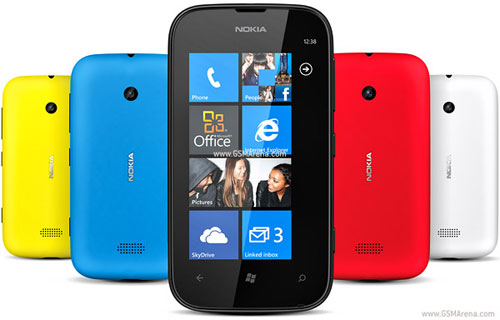
Learn how to start using your phone.
Keys and parts
1 — Connector for headphones and loudspeakers (3.5 mm)
2 — Earpiece
3 — Proximity sensor. Do not cover, for example, with protective film or tape.
4 — Volume key
5 — Power/Lock key
6 — Camera key
7 — Microphone
8 — Back key
9 — Start key
10 — Search key
11 — Micro-USB connector. Used also to charge the battery.
12 — Camera lens
13 — Loudspeaker

Also can too using USB charging when a wall outlet is not available. Data can be transferred while charging the device. The efficiency of USB charging power varies significantly, and it may take a long time for charging to start and the device to start functioning.
1. First connect the USB cable to the computer, then to your phone.
2. When the battery is full, first unplug the USB cable from your phone, then from the computer.
If the battery is completely discharged, it may take several minutes before the charging indicator is displayed or before any calls can be made.
If you to read full, you can download user manual below.
Download Nokia Lumia 510 quick manual/user guide (Pdf)
Thursday, November 29, 2012
Nokia Asha 308 Dual SIM quick manual/user guide
Nokia Asha 308 Dual SIM quick manual/user guide - Nokia Asha 308 is the latest mobile phone series Asha Touch that comes with two SIM card slots GSM + GSM (Easy Swap). Nokia Asha 308 has a capacitive touch screen measuring 3 inches with a resolution of 240 x 400 pixels (155ppi). Smartften Xstream EVDO
Nokia Asha 308 comes with a 2 megapixel camera, FM radio, music & video player, Bluetooth, Accelerometer, GPRS / EDGE, Java, microSD slot up to 32GB, and battery capacity of 1110mAh.
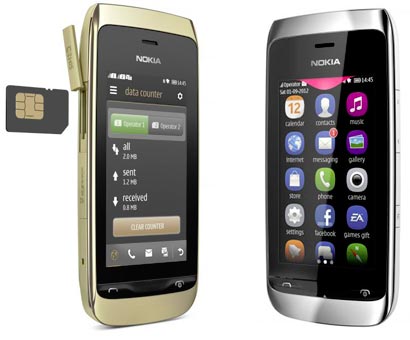
Easily get your contacts, calendar, and other stuff to your new phone.
1. Switch Bluetooth on in both phones.
2. On your new phone, select settings and sync & backup > phone switch.
3. Select copy to this and what you want to copy, then select .
4. Select your old phone from the list of found devices.
5. Follow the instructions shown on both phones.
Add a shortcut to My screen:
Want to open your favourite apps straight from My screen? Add
shortcuts to your most used features.
1. Tap and hold My screen, and select shortcut.
2. Select an item, such as a widget or action, and select .
Remove a shortcut
Tap and hold My screen, and select on the shortcut you want to
remove.
Tip: Try tapping different areas on My screen. You can, for example,
change the date and time, set alarms, or add to your calendar also
from My screen.
Set a song as your ringtone
Want to use your favourite song from the music player as your
ringtone? You can also take the best section of the song and use that
as your ringtone.
1. Select settings > tone profiles and a profile.
2. When setting a ringtone for the profile, select open files, and browse to the song.
3. When asked if you want to adjust the start and end points of the tone, select YES.
4. Drag the start marker to the start point.
5. Drag the end marker to the end point.
When a marker is moved to a new point, the selection plays.
6. To manually play the selection, select .
7. Select and The edited ringtone does not replace the original ringtone or sound
clip. Preset ringtones cannot be modified, and not all formats of
ringtones are supported.
And More Tips anda Trobleshooting , you can download below. and Get the user guide in PDF format:
Download Nokia Asha 308 User Guide 2.26 MB
Tuesday, November 27, 2012
Nokia Asha 309 Manual User Guide
Nokia Asha 309 Manual User Guide PDF Download - This Nokia Asha 309 user manual is available for FREE at Nokia website, Nokia Asha 309 merely collect the information, we neither affiliated with the author Nokia Asha 309 (s), the website and any brand(s) nor responsible for its content and change of content Nokia Asha 309. (Read our disclaimer before you download the document from the website).

Improvements and changes to this Nokia Asha 309 user manual necessitated by typographical errors, inaccuracies of current information, or improvements to programs and/or equipment, may be made by Nokia at any time and without notice. The information collected in this process is not associated with a specific personal identity
- Dimensions: 109.9 x 54 x 13.2 mm
- Weight: 102 g (3.60 oz)
- 2G Network: GSM 850 / 900 / 1800 / 1900
- SIM: Mini-SIM
- Internal memory: 20 MB, 128 MB ROM, 64 MB RAM
- Card slot: microSD, up to 32 GB, 2 GB included
- Data speed: Up to 236.8 kbps
- WLAN: Wi-Fi 802.11 b/g/n
- Bluetooth: Yes, v3.0 with A2DP
- USB: Yes, microUSB v2.0
- Audio Jack: 3.5mm jack
- Camera: 2 Megapixel (1600×1200 pixels)
- Video: Yes, 176×144 @10fps
- Sensors: Accelerometer
- Messaging: SMS, MMS, Email, IM
- Browser: WAP 2.0/xHTML, HTML
- Radio: Stereo FM radio with RDS, FM recording
- Games: Yes + downloadable
- GPS: No
- Java: Yes, MIDP 2.1
- Colors: Black, White
- Standard battery: Li-Ion 1110 mAh (BL-4U)
- Stand-by time: Up to 650 h
- Talk time: Up to 6 h
- Music play: Up to 40 h
Download Nokia Asha 309 manual.PDF (2.14 MB)
Monday, November 26, 2012
Nokia Lumia 810 Manual User Guide
Nokia Lumia 810 Manual User Guide and Operating Instruction - This Nokia Lumia 810 user manual is available for FREE at Nokia official website, we merely collect the information, we neither affiliated with the author(s), the website and any brand(s) nor responsible for its content and change of content. (Read our disclaimer before you download the document from the website).
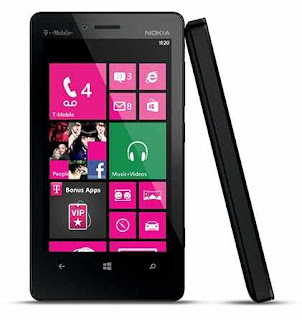
To open the camera, press the camera key.
To zoom in or out, place two fingers on the screen, and slide your fingers together or apart.
To focus, press and hold the camera key halfway down. The focus is locked when the white rectangle stops blinking.
To take the photo, press the camera key down fully.
If your phone isn’t responding, do the following:
Switch the phone off, and remove the battery. After about a minute, put the battery back in, and switch the phone on.
Update your phone software.
Reset your phone. This restores the factory settings, and erases all your personal content, including apps you’ve purchased and downloaded. On the start screen, swipe left, and tap Settings -> about -> reset your phone.
To know more about operating instruction and troubleshooting tips of Nokia Lumia 810 mobile phone, you can download this Nokia Lumia 810 user manual below.
Are you a Nokia Lumia 810 owner? Here is Nokia Lumia 810 owner manual or user guide for you. This manual is available online and you can download it directly from Nokia website. This manual comes in 116 pages of PDF document format (1.18 MB). This Nokia Lumia 810 user guide contains any information and instructions how to operate the Nokia Lumia 810 properly. As described at Nokia official website, Nokia Lumia 810 comes with these specification and features:
Download Nokia Lumia 810 user guide.pdf (1.18 MB)
Nokia Lumia 822 Manual User Guide
Nokia Lumia 822 Manual User Guide - This Nokia Lumia 822 manual or user guide is available for FREE at Nokia website, we merely collect the information, we neither affiliated with the author(s), the website and any brand(s) nor responsible for its content and change of content. (Read our disclaimer before you download the document from the website).
How to Backup your contacts?
Solution:
1. From the start screen, swipe left, and tap Settings -> Backup Assistant Plus.
2. Tap sync now to sync and backup your contacts immediately.
3. Tap settingsto set the sync feature on or off.
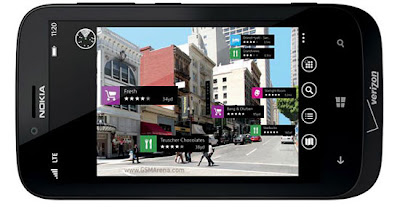
To know more about operating instruction and troubleshooting tips of Nokia Lumia 822, please download this Nokia Lumia 822 user guide.
Quick operating guide of Nokia Lumia 822 smartphone at a glance:
How to Create a Microsoft account?
Solution:
To create a Microsoft account later, open a Microsoft app or service on your phone.
Or, from the start screen, swipe left, and tap Settings -> email + accounts -> add an account. To create your account on the internet, go to www.live.com
How to Backup your contacts?
Solution:
1. From the start screen, swipe left, and tap Settings -> Backup Assistant Plus.
2. Tap sync now to sync and backup your contacts immediately.
3. Tap settingsto set the sync feature on or off.
How to Create a Microsoft account?
Solution:
To create a Microsoft account later, open a Microsoft app or service on your phone.
Or, from the start screen, swipe left, and tap Settings -> email + accounts -> add an account. To create your account on the internet, go to www.live.com
Download Nokia Lumia 822 user guide.pdf (12.36 MB)
Monday, November 12, 2012
Nokia Lumia 920 quick manual/user guide
Nokia Lumia 920 quick manual/user guide Download Pdf Instruction Support Setting Troubleshooting - Now Nokia Lumia 920 available user manual / guide for you download link from Nokia below, before you download, read a little review Nokia Lumia 920.
Nokia Lumia 920, carrying a screen size of 4.5 inches, a resolution of 1280x768 pixels. Nokia 920 uses an 8 megapixel camera, and has a feature optical image stabilization technology PureView. Also kemeranya have used Carl Zeiss, resulting jepretannya better with other smartphones.
This latest smartphone, reportedly will be better than its predecessor smartphone. Nokia Lumia 920, running Windows Phone 8. Windows Phone 8, is the latest operating system from Microsoft. And the Nokia Lumia 920, the first Nokia smartphone that uses Windows Phone 8 is also the Nokia Lumia 820. Nokia maintained the unique and beautiful design of the smartphone predecessor, and uses a glossy polished Polycarbonate material.
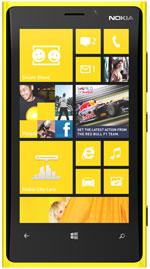
The features are very digembar today heralding the pureview camera and NFC technology really - really pinned. unfortunately not only pureview 41mp but only 8. 1MP, like the data that we obtained successful
This is one of the tips in the guide, and his next can be downloaded at the link below
How to Charge your phone with a USB charger?
Your battery has been partially charged at the factory, but you may need to recharge it before you can switch the phone on for the first time.
Make sure you use a compatible USB charger to charge your phone.
1. First connect the USB cable to the charger, and plug the charger into a wall outlet, then connect the micro-USB end of the cable to your phone.
2. When the battery is full, disconnect the charger from the phone, then from the wall outlet. You don't need to charge the battery for a specific length of time, and you can use the phone while it's charging. If your phone is off when you start charging, it automatically switches on. If the battery is completely discharged, it may take several minutes before the charging indicator is displayed or before any calls can be made.
Tip: Also can too using USB charging when a wall outlet is not available. Data can be transferred while charging the device. The efficiency of USB charging power varies significantly, and it may take a long time for charging to start and the device to start functioning.
First connect the USB cable to the computer, then to your phone. When the battery is full, first disconnect the USB cable from your phone, then from the computer.
Here you are the User Guide PDF Manual Copy / for Nokia Lumia 920 directly from Nokia official website. Nokia Lumia 920 user guide in English, Download from the Links below
[Download Nokia Lumia 920 quick manual/user guide]
Friday, November 9, 2012
Nokia 109 quick manual/user guide
Nokia 109 quick manual/user guide Download Pdf Instruction Support Setting Troubleshooting - Now Nokia 109 available user manual / guide for you download link from Nokia below, before you download, read a little review Nokia 109. While busy promoting the Lumia, Nokia flagship smartphone, the Finnish mobile giant is not forgotten underclass konsimen it by launching the Nokia 109.
Nokia's latest mobile phone has a 1.8 inch TFT screen mini screen with a resolution of 128x160 pixels. Its dimensions are 110 x 46 x14, 8 mm and weighs 77 grams. As with most mobile phones made by Nokia to other entry-level, the model 109 is also still carrying the alphanumeric keyboard, making it easier for users to type SMS and other activities.

As quoted from Selular.co.id, Nokia 109 operates using S40 platform and runs on dual-band GSM / EDGE. Provide comfort to the user when accessing the internet. Finnish vendor will also provide the type 109 with Nokia Xpress Browser feature, which compresses web pages by up to 90 percent, so it certainly can save the cost of data consumption. This is to provide a web experience that is easy and inexpensive.
Some social media applications pre-installed on the device. Users can directly access Facebook and Twitter from the home screen. If you want to download the eBuddy instant messaging, applications are available in the Nokia Store. There are hundreds of free applications and games that occupy the Nokia Store, including premium titles from ten games EA (Electronic Arts). There is also an FM radio and a microSD card up to 32GB.
Although cheap mobile phone, Nokia claims the battery resistance can last for 33 days of normal use and the duration of talk time 7.5. Nokia 109 will soon be gliding markets of Europe, Asia Pacific and China. There are two options ie colors Cyan and Black. The price of a Nokia 109 mobile units, the subject sales of U.S. $ 42
This is one of the tips in the guide, and his next can be downloaded at the link below
Make calls quickly ?
Call someone often? Set their number as a speed dial.
1. Select Menu > Contacts
2. Select More > Speed dials and a free slot, then select Assign.
3. Select Search and a contact
4. To call, press and hold a number key on the home screen.
Tip: To change a speed dial, select Options > Change.
How to Write text ?
Press a key repeatedly until the letter is shown. To type in a punctuation mark, press 1 repeatedly. To type in a special character, press *, then select the character. To switch between character cases, press #. To use number mode, press and hold#, then select Number mode. To go back to letter mode, press and hold #. If you want to quickly type in a single number, just press and hold the number key. To switch predictive text on or off, select Options > Prediction, then select On or Off. Not all languages are supported. To change the writing language, select Options > Writing language.
Here you are the User Guide PDF Manual Copy / for Nokia 109 directly from Nokia official website. Nokia 109 user guide in English, Download from the Links below
Here you are the User Guide PDF Manual Copy / for Nokia 109 directly from Nokia official website. Nokia 109 user guide in English, Download from the Links below
[Download Nokia 109 quick manual/user guide]
Thursday, November 8, 2012
Nokia Lumia 620 Full Spec, quick manual/user guide
Nokia Lumia 620 Full Specifications, quick manual/user guide Download Pdf Instruction Setting Troubleshooting - Nokia Lumia 620 is a smartphone that uses Windows Phone OS 8. Nokia Lumia 620 comes with a touch screen measuring 3.8 inches with a resolution of 480 x 800 pixels (246ppi).
Nokia Lumia 620 is powered by a 1GHz dual core Krait processor, Adreno 305 GPU and 512MB RAM. Nokia Lumia 620 has 8GB of internal memory plus a microSD slot up to 64GB.

Nokia Lumia 620 is also equipped with a 5 megapixel camera with 720p HD video recording capability, VGA front camera, 3G HSDPA and HSUPA, WiFi, Bluetooth, NFC and 1300mAh capacity battery.
Nokia Lumia 620 Full Specifications:
=======================================================================
=======================================================================
GENERAL
Network 2G: GSM 850 / 900 / 1800 / 1900
3G: HSDPA 850 / 900 / 1900 / 2100
Announced 2012, 4Q
Processor CPU: Dual-core 1 GHz Krait, GPU: Adreno 305
SAR Rating
COLOR
Available Lime green, orange, magenta, yellow, cyan, white, black
SIZE
Dimensions (mm) 115.4 x 61.1 x 11
Weight (g) 127
DISPLAY
Type TFT capacitive touchscreen, 16M colors
Size 480 x 800 pixels, 3.8 inches (246 ppi pixel density), ClearBlack
Lines 0
Menu Touchscreen
DESIGN
Type Candybar
Antenna Fixed Internal
KEYS
Navigation Touchscreen
QWERTY No
MEMORY
Internal (MB) 8 GB storage, 512 MB RAM
Expansion microSD up to 64GB
BATTERY
Type Standard battery, Li-Ion 1300 mAh (BL-4J)
Stand-by (hrs) Up to 330 hours
TalkTime(min) Up to 14 h 40 min (2G) / Up to 9 h 50 min (3G)
RINGTONES
Customization Yes
AUDIO
Format MP3/WAV/eAAC+/WMA
MP3 Player Yes
FM Radio No
A2DP Yes
VIDEO
Format MP4/H.264/H.263/WMV
Recorder Yes, 7200p
TV Null
ENTERTAINMENT
Games Yes, Downloadable
MESSAGING
SMS Yes
MMS Yes
EMS Yes
Email Yes
CONNECTIVITY
HSDPA Yes, HSDPA, 21 Mbps; HSUPA, 5.76 Mbps
EDGE Yes
Bluetooth Yes, v3.0, EDR
3G Yes
GPRS Yes
Infrared (IrDA) No
USB Port Yes
WIFI/WLAN Yes, Wi-Fi 802.11 a/b/g/n, dual-band
Data Cable Yes
GPS Yes
SOFTWARE
Java (J2ME) No
WAP No Info
Platform OS Windows Phone 8
Browser xHTML, HTMIL
Others Application 7GB free SkyDrive
PERSONAL
Themes Yes
Caller ID Yes
Profile ID Yes
CAMERA
Lens Type CMOS, 5.0 Megapixel
Max. Resolution 2592х1936 pixels
Flash Yes
Night Mode No
Frame Types
Extra Features Auto-focus, Geo-Tagging
Photo Format JPG
Front Camera Yes, VGA
=======================================================================
Nokia Lumia 620 quick manual/user guide :
The Nokia Lumia 620 User manual or user guide is not yet available online for this time, it will be available here after the phone released to the market. back here later for check avaliable the user guide availability. Thank's You.
Monday, November 5, 2012
Nokia 114 quick manual/user guide
Nokia 114 quick manual/user guide Download Pdf Instruction Setting - Now Nokia 114 available user manual / guide for you download link from Nokia below, before you download, read a little review Nokia 114.

The latest mobile phones Nokia 114 comes with a candybar design with size 110 x 46 x 14.8 mm and weighs 77 gram.Nokia 114 has a screen measuring 1.8 inch with a resolution of 128 x 160 piksel.Nokia 114 is equipped with other features such as a VGA camera, GPRS / EDGE, the battery capacity of 102mAh, MP3/MP player, Bluetooth 2.1, FM radio, JAVA, and microSD slot up to 32GB
Nokia brings back the latest mobile phones at affordable prices, the news that has just introduced a dual SIM GSM + GSM newest named Nokia 114. Nokia introduces 114 silent, the phone was first revealed through the official website of Nokia India.Nokia 114 is very similar to the Nokia 109, with 65K color screen with a resolution of 128 x 160px in size only 1.8 inch screen. The main difference of the Nokia 109, Nokia 114 features DUAL SIM.
This is one of the tips in the guide, and his next can be downloaded at the link below
How To Write text
- Press a key repeatedly until the letter is shown.
- To type in a punctuation mark, press 1 repeatedly.
- To type in a special character, press *, then select the character.
- To switch between character cases, press #.
- To use number mode, press and hold #, then select Number mode. To go back to letter mode, press and hold #.
- If you want to quickly type in a single number, just press and hold the number key.
- To switch predictive text on or off, select Options > Prediction, then select On or Off. Not all languages are
- supported.
- To change the writing language, select Options > Writing language.
Nokia Life is a set of services giving you relevant info on topics such as health, agriculture, education, and entertainment. The updates are delivered in text messages to the Nokia Life inbox, in your local language. To get started, open the Nokia Life app, then accept the service disclaimer. Nokia Life may not be available in all regions.
Here you are the User Guide PDF Manual Copy / for Nokia 114 directly from Nokia official website. Nokia 114 user guide in English, Download from the Links below
[Download Nokia 114 quick manual/user guide]
Sunday, November 4, 2012
Nokia Lumia 820 quick manual/user guide
Nokia Lumia 820 quick manual/user guide Download Pdf Instruction Setting - As we know, a few days ago Nokia reportedly preparing two new Windows Phone 8 phones namely Lumia 920 and Lumia 820. Unlike the Lumia 920 which is a flagship technology that carries PureView Nokia, Lumia 820 comes without the presence Arrow PureView in camera technology.

Mobile Lumia 820 is expected to be positioned below PureView once Lumia 920 Lumia 800 replaced. Mengsung Lumia 820 is a smaller screen than the Lumia 920, which is just 4.3 inches with resolution of 480 x 800 pixels. Nokia Lumia 820 positioned to target the middle class, unfortunately unknown detailed specs such as processor speed and the frequency used, while the RAM memory, the Lumia 820 will be equipped with 512 MB of RAM memory.
At the beginning of Lumia 820 will bring the Xbox software, Internet Explorer browser and Microsoft Office software as well as a tiny icon that identifies the operating system used is Windows Phone 8 or Windows Phone Apollo.
Here you are the User Guide PDF Manual Copy / for Nokia Lumia 820 irectly from Nokia official website. Nokia Lumia 820 user guide in English, Download from the Links below.
[Download Nokia Lumia 820 quick manual/user guide]
Saturday, November 3, 2012
Nokia Asha 205 quick manual/user guide
Nokia Asha 205 quick manual/user guide Download Pdf Instruction Setting - Nokia Asha 205 is a continuation of the 11 members that have been Asha line first launched. Its main feature is a separate Facebook button that is planted on the phone with a QWERTY keyboard. "Users can directly access Facebook in one hit,"
In addition to the Facebook, this phone has been equipped with applications Twitter and eBuddy. EBuddy application is integrated with the Nokia platform so that, when a message comes in, the user will receive a notification though eBuddy application is not running. There are also 40 games from Electronic Arts

In addition to the Nokia Asha 205, the Finnish vendor Nokia unveiled the 206 DS, which features Self Portrait. With this feature, when a user would take a photo of yourself, there will be guiding the direction of the sound in order to fit the image. This phone features an alphanumeric keypad with a 2.4-inch screen and 1.3 megapixel camera
Both devices are equipped with applications Slam, called Irwan like data transfer technology called Near Field Communication (NFC) at which time delivery of data, devices placed close together. This feature runs with Bluetooth, but cut a few steps of delivery, such as pairing and search the name of the device. "The Slam features, the phone will search for nearby Bluetooth devices it lit," This feature can be used to send data to any device that has Bluetooth.
[Download Nokia Asha 205 quick manual/user guide]
Friday, November 2, 2012
Nokia 808 PureView quick manual/user guide
Nokia 808 PureView quick manual/user guide Download Instructions - Here you are the User Guide PDF Manual Copy / for Nokia 808 PureView irectly from Nokia official website. Nokia 808 PureView user guide in English, Download from the Links below. Use of incompatible SIM cards may damage the card or the device, and may corrupt data stored on the card.
Do not use SIM cards that have been modified to fit the micro-SIM holder. To replace a standard SIM card with a micro-SIM card, contact your service provider.
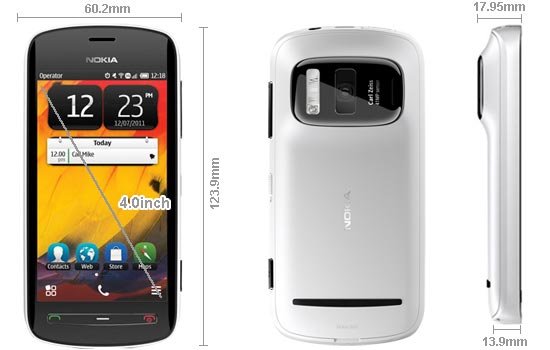
Do not attach any stickers to your SIM.
- Make sure the phone is switched off.
- Place your fingernail in the gap on the bottom edge of the back cover, then carefully lift and remove the cover
- If the battery is in the phone, lift it out.
- Slide the SIM holder to unlock it. Use your fingernail to lift the SIM holder.
- Make sure the contact area would face down, put the SIM into the holder, then lower the holder.
- Slide the SIM holder to lock it.
- Line up the battery contacts, push the battery in, then replace the back cover.
Remove the SIM
- Switch the phone off.
- Remove the back cover.
- If the battery is in the phone, lift it out.
- Open the SIM holder, then pull the card out.
Insert a memory card
Memory cards are available separately. Use only compatible MicroSD and MicroSDHC cards approved by Nokia for use with this device. Incompatible cards may damage the card and the device and corrupt data stored on the card.
- Make sure the phone is switched off.
- Place your fingernail in the gap on the bottom edge of the back cover, then carefully lift and remove the cover.
- If the battery is in the phone, lift it out.
- Slide the memory card holder to unlock it. Use your fingernail to lift the memory card holder.
- Make sure the contact area would face down, put the memory card into the holder and lower the holder. Memory cards are available separately. For Full HD (1080p) videos, a Class 6 memory card is recommended.
- Slide the memory card holder to lock it.
- Line up the battery contacts, push the battery in, then replace the back cover.
Remove the memory card
- Switch the phone off.
- Remove the back cover.
- If the battery is in the phone, lift it out.
- Open the memory card holder, then pull the card out.
Charge the battery
Your battery has been partially charged at the factory, but you may need to recharge it before you can switch on your phone for the first time.
- If your phone needs recharging
- When the battery is full
Also can too using USB charging when a wall outlet is not available. Data can be transferred while charging the device. The efficiency of USB charging power varies significantly, and it may take a long time for charging to start and the device to start functioning. You do not need to charge the battery for a specific length of time, and you can use the phone while it is charging. If the battery is completely discharged, it may take several minutes before the charging indicator is displayed or before any calls can be made. If the battery has not been used for a long time, to begin charging, you may need to connect the charger, then disconnect and reconnect it.
[Download Nokia 808 PureView quick manual/user guide]
Subscribe to:
Posts (Atom)