Showing posts with label Sony. Show all posts
Showing posts with label Sony. Show all posts
Wednesday, November 28, 2012
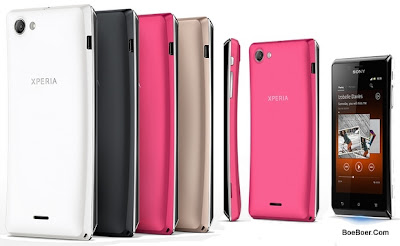
Sony Xperia J ST26i/ ST26a Manual User Guide
Sony Xperia J ST26i/ ST26a Manual User Guide - Please read the Important information leaflet before you use your mobile phone. Some of the services and features described in this User guide are not supported in all countries/regions or by all networks and/or service providers in all areas. Without limitation, this applies to the GSM International Emergency Number 112. Please contact your network operator or service provider to determine availability of any specific service or feature and whether additional access or usage fees apply.
- Press and hold down the power keyon the right side of the phone until the phone vibrates.
- If your screen goes dark, briefly press the power key to activate the screen.
- To unlock the screen, drag to the right across the screen.
- Enter your SIM card PIN when requested, and select OK.
- Wait a while for the phone to start.
from the Settings menu. To correct a mistake made while entering your SIM card PIN, tap .
To turn off the phone
- Press and hold down the power key
- In the options menu, tap Power off.
- Tap OK.
Setup guide
The first time you start your phone, a setup guide opens to explain basic phone functions and help you enter essential settings. This is a good time to configure the phone to your specific needs. You can also access the setup guide later from the Application screen.
To access the setup guide manually
- From the Home screen, tap .
- Find and tap Setup guide.
Download User Guide of Xperia J ST26i/ST26a | Language: English | Page: 132 | PDF Size: 9.01MB
Download User Guide of Xperia J ST26i/ST26a | Language: Spanish | Page: 138 | PDF Size: 8.83MB
Download User Guide of Xperia J ST26i/ST26a | Language: Germany | Page: 143 | PDF Size: 8.84MB

Sony Xperia TX LT29i Manual User Guide
Sony Xperia TX LT29i Manual User Guide - Along with Li-ion battery 1750 mAh capacity installed, the Xperia TX has 127 grams weight (approximately about 4.5 ounces). The dimension size is 131 x 68.6 x 8.6 in millimeter (Height X Width X Depth). The casing cover colors of this phone are available in three choices: Black, Pink and White.
Of course the Wi-Fi, USB with microUSB v2.0, Bluetooth v3.1, Stereo FM Radio, 3G HSPA up to 42Mbps, Wi-Fi Direct, Wi-Fi Hotspot, DLNA, NFC, also ready to be used. Preoloaded Google applications such as GMail, Google Maps, Voice Search, Google Talk, Google Play are also included.
There are also many tutorial that might need to give an attention, such as how you can backup the data of you phone, how you can use the alarm clock, pairing the bluetooth, learn to connect or use the Wi-Fi, settings language and applications, download games from Google Play and many more.
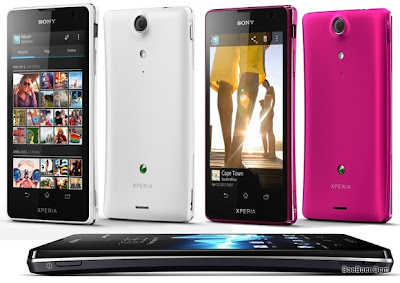
Table of Contents of Sony Xperia TX LT29i User Manual
Important informationAndroid – what and whyGetting startedGetting to know your phoneCallingContactsMessagingGoogle TalkTimescapeGetting started with Google PlayPlayNow serviceVideo UnlimitedMusic UnlimitedGetting organisedScanning with the NeoReaderSynchronising dataNFCConnecting to wireless networksWeb browserListen music via Walkman Player
And for the Xperia TX LT29i User Manual, you can get it from the link below. You can also make it fast on downloading it if you have Download Manager application. Otherwise, just read it online.Identifying music using TrackIDUsing the FM radioTaking photos and recording videosView photos and videos in AlbumPlaying video clips in MoviesShare content with DLNA CertificateBluetooth wireless technologyConnecting phone to a computerConnecting phone to TV setUse Location service for positionBackup and restore applicationLock and Protect PhoneUpdating your phonePhone settingsStatus and Notification iconsApplications overviewUser supportTroubleshootingRecycling your phoneLegal informationIndex
Download Sony Xperia TX LT29i User Guide | Language: English | PDF Size: 2.28MB | Page: 151
Download Sony Xperia TX LT29i User Guide | Language: Spanish | PDF Size: 2.34MB | Page: 157
Download Sony Xperia TX LT29i User Guide | Language: German | PDF Size: 2.35MB | Page: 160
Download Sony Xperia TX LT29i User Guide | Language: Italian | PDF Size: 2.33MB | Page: 155
Sony Xperia T LT30p quick manual/user guide
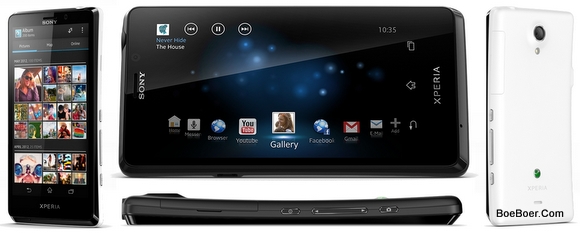
Sony Xperia T LT30p quick manual/user guide - Please read the Important information leaflet before using your cell phone. Some of the services and features described in this User Guide are not supported in all countries/regions or by all networks and/or service providers in all areas. Without limitation, this applies to the GSM International Emergency Number, 112. Please contact your network operator or service provider to determine availability of any specific service or feature and whether additional access or usage fees apply.
Use of certain features and applications described in this guide may require access to the Internet. You may incur data connection charges when you connect to the Internet from your phone. Contact your wireless Service provider for more information.
Make sure the battery is charged for at least 30 minutes before you turn on the phone for the
first time.
- Press and hold down the power key
- on the right side of the phone until the
- phone vibrates.
- If your screen goes dark, briefly press the power key
- to activate the screen.
- To unlock the screen, drag
- to the right across the screen.
- Enter your SIM card PIN when requested, and select OK.
- Wait a while for the phone to start.
from the Settings menu. To correct a mistake made entering your SIM card PIN, tap .
To check the battery level
- From your Home screen, tap .
- Find and tap Settings > About phone > Status > Battery level.
The following tips can help you improve battery performance:
- Charge your phone frequently. This will not affect the lifetime of the battery.
- Downloading data from the Internet is power consuming. When you're not using the Internet, you can save power by disabling all data connections over mobile networks. This setting does not prevent your phone from transmitting data over other wireless networks.
- Turn off GPS, Bluetooth™, and Wi-Fi® when you don't need these features. You can turn them on and off more easily by adding the Quick settings widget to your Home screen. You do not need to turn off 3G.
- Use the Power Saver feature to reduce battery consumption. You can select the power saving mode that best suits the way you use your phone. You can also customize the settings of each power saving mode.
- Set your synchronization applications (used to synchronize your email, calendar and contacts) to synchronize manually. You can also synchronize automatically, but increase the synchronization intervals.
- Check the battery usage menu in the phone to see which applications use the most power. Your battery consumes more power when you use video and music streaming applications, such as YouTube™. Some applications downloaded from Google Play™ may also consume more power.
- Close and exit applications that you are not using.
- Lower the screen display brightness level.
- Turn off your phone or activate the Airplane mode setting if you are in an area with no network coverage. Otherwise, your phone repeatedly scans for available networks, and this consumes power.
- Use a Sony original handsfree device to listen to music. Handsfree devices demand less battery power than the phone's loudspeakers.
- Keep your phone in standby whenever possible. Standby time refers to the time during which the phone is connected to the network and is not being used.
- Disable any live wallpaper.
- Go to www.sonymobile.com to get the latest battery performance tips for your phone model.
Download Sony Xperia T LT30p/ LT30a User Guide | Language: English | Page: 306 | PDF Size: 10.56MB
Download Sony Xperia T LT30p User Guide | Language: English | Page: 153 | PDF Size: 2.36MB
Download Sony Xperia T LT30p User Guide | Language: Spanish | Page: 159 | PDF Size: 2.42MB
Download Sony Xperia T LT30p User Guide | Language: Germany | Page: 162 | PDF Size: 2.43MB
Download Sony Xperia T LT30p User Guide | Language: English | Page: 157 | PDF Size: 2.41MB
Friday, November 9, 2012
Sony Xperia Miro User Guide Manual
Sony Xperia Miro quick manual/user guide Download Pdf Instruction Support Setting Troubleshooting - Now Sony Xperia Miro ST23a available user manual / guide for you download link from Sony below, before you download, read a little review Sony Xperia Miro ST23a.
Sony Xperia Miro - Of the network and the Internet, the features of the Xperia Miro is the same as that used by the Tipo series. The handset also uses the same battery as the Dual Tipo Tipo and 1500 mAh and 1460 mAh Typical Minium. Sony says that the battery used these products can last up to 5 hours for the use of talk and up to 470 hours on standby when used in a GSM network.
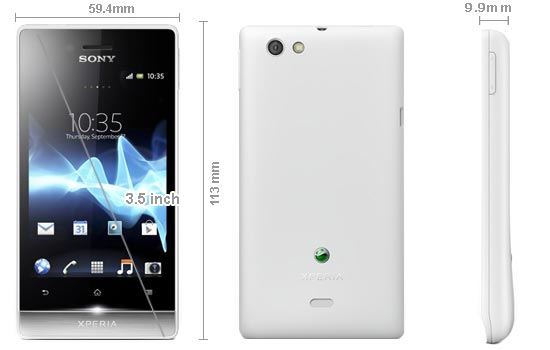
The handset is equipped with a Qualcomm MSM7225A 800 MHz processor and uses Google's operating system is Android 4.0 Ice Cream Sandwich. Besides having 512MB of RAM, Miro also has an internal storage capacity of 4GB which can be expanded using a microSD larger.
Like the duo Tipo, Miro Xperia will be available in four color variants of black, black / pink, white and white / gold. According Xperiablog.net, users will get a warning light when one or more messages when get a new notification on his Facebook account.
This is one of the tips in the guide, and his next can be downloaded at the link below
Tips Charging the battery:
Your phone battery is partly charged when you buy the phone. When you connect the phone charger cable to a power source, such as a USB port or a phone charger, it may take a few minutes before the battery icon appears on the screen. You can still use your phone while it is charging. Charging the phone over a long period of time, for example, overnight, does not damage the battery or the phone.
Note: The battery will start to discharge a little after it is fully charged and then charges again after a certain time when the phone charger is connected. This is to extend battery life and may result in the charge status Showing a level below 100 percent.
To charge the phone :
- Plug the phone charger into a power outlet.
- Plug one end of the USB cable into the charger (or into the USB port of a computer).
- Plug the other end of the cable into the micro USB port on your phone, with the USB symbol facing up. The battery status LED lights up when charging starts. If the battery is completely discharged, it may take a few minutes before the LED lights up after you connect the phone charger cable to a power source.
- When the battery status LED is green, the phone is fully charged. Disconnect the USB cable from your phone by pulling it straight outwards. Make sure not to bend the connector when removing the cable from the phone.
Use the charger and USB cable provided with the phone to ensure faster charging
How To share your phone’s data connection using a USB cable?
- Deactivate all USB cable connections to your phone.
- Using the USB cable that came with your phone, connect your phone to a computer.
- From your Home screen, tap .
- Find and tap Settings > More… > Tethering & portable hotspot.
- Mark the USB tethering checkbox. The phone starts sharing its mobile network data connection with the computer over the USB connection. An ongoing notification appears in the status bar and the Notification panel.
- Unmark the USB tethering checkbox, or disconnect the USB cable to stop sharing your data connection.
You cannot share your phone’s data connection and SD card over a USB cable at the same time. For more information, see Connecting your phone to a computer on page 106.
You may need to prepare your computer to establish a network connection via USB cable. Go to android.com/tether to get the most current information.
To more Information, Here you are the User Guide PDF Manual Copy / for Sony Xperia Miro ST23a directly from Sony official website. Sony Xperia Miro ST23a user guide in English, Download from the Links below
[Download Sony Xperia Miro ST23a User Manual English or You can download for Francais Here)
This Sony Xperia E dual have a complete Spec, quick manual/user guide
This Sony Xperia E dual have a complete Spec, quick manual/user guide Download Pdf Instruction Setting Troubleshooting - Sony Xperia E dual ICS is Android 4.0 smartphone that comes with two SIM card slot support GSM + GSM. Sony Xperia E dual has a large 3.5-inch touch screen with a resolution of 320 x 480 pixels (165ppi).

Sony Xperia E dual powered with a 1GHz single-core processor, Adreno 200 GPU and 512MB RAM. Sony Xperia E is also equipped with dual 3.2 megapixel camera, 4GB of internal memory plus a microSD slot, 3G HSDPA and HSUPA, WiFi hotspot with WiFi, Bluetooth, GPS, and a 1530mAh capacity battery.
This Sony Xperia E dual have a complete Spec :
=======================================================================
=======================================================================
GENERAL
Network Dual SIM
GSM 850 / 900 / 1800 / 1900
3G: HSDPA 900 / 2100
Announced 2012, 4Q
Processor CPU: 1GHz, GPU: Adreno 200
SAR Rating
COLOR Available
SIZE
Dimensions (mm) 113.5 x 61.8 x 11
Weight (g) 115.7
DISPLAY
Type TFT capacitive touchscreen, 256K colors
Size 320 x 480 pixels, 3.5 inches (165 ppi pixel density)
Lines 0
Menu Touchscreen
DESIGN
Type Candybar
Antenna Fixed Internal
KEYS Navigation Touchscreen : Multitouch up to 2
QWERTY No
Soft
Other
Lighting
MEMORY
Phonebook
Internal (MB) 4 GB (2 GB user available), 512 MB RAM
Expansion microSD up to 32GB
BATTERY
Type Standard battery, Li-Ion 1530 mAh
Stand-by (hrs) Up to 530 h (2G) / Up to 530 h (3G)
TalkTime(min) Up to 6 h 12 min (2G) / Up to 6 h 18 min (3G)
RINGTONES
Polyphonic
Customization Yes
AUDIO
Format MP3/AAC
MP3 Player Yes
Voice
FM Radio Yes
A2DP Yes
VIDEO
Format MP4/3GP
Recorder Yes
TV Null
ENTERTAINMENT
Games Yes, Downloadable
MESSAGING
SMS Yes
Total SMS
MMS Yes
EMS Yes
Email Yes
IM
Push-To-Talk
CONNECTIVITY
HSDPA Yes, HSDPA, 7.2 Mbps; HSUPA, 5.76 Mbps
EDGE Yes
Bluetooth Yes, v2.1, EDR
3G Yes
GPRS Yes
Infrared (IrDA) No
USB Port Yes
WIFI/WLAN Yes, Wi-Fi 802.11 b/g/n, DLNA, Wi-Fi hotspot
Data Cable Yes
Data Modem
GPS Yes
SOFTWARE
Java (J2ME) No
WAP No Info
Platform OS Android OS - 4.0.4 Ice Scream Sandwich
Browser xHTML, HTMIL
Predictive Text Entry
Speech Codes
PIM Application
Others Application Google Apps
PERSONAL
Themes Yes
Caller ID Yes
Profile ID Yes
CAMERA
Lens Type CMOS, 3.2 Megapixel
Digital zoom
Max. Resolution 2048x1536 pixels
Flash No
Night Mode No
Multi Shot
Frame Types
Extra Features Geo-tagging
Photo Format Yes
Network Dual SIM
GSM 850 / 900 / 1800 / 1900
3G: HSDPA 900 / 2100
Announced 2012, 4Q
Processor CPU: 1GHz, GPU: Adreno 200
SAR Rating
COLOR Available
SIZE
Dimensions (mm) 113.5 x 61.8 x 11
Weight (g) 115.7
DISPLAY
Type TFT capacitive touchscreen, 256K colors
Size 320 x 480 pixels, 3.5 inches (165 ppi pixel density)
Lines 0
Menu Touchscreen
DESIGN
Type Candybar
Antenna Fixed Internal
KEYS Navigation Touchscreen : Multitouch up to 2
QWERTY No
Soft
Other
Lighting
MEMORY
Phonebook
Internal (MB) 4 GB (2 GB user available), 512 MB RAM
Expansion microSD up to 32GB
BATTERY
Type Standard battery, Li-Ion 1530 mAh
Stand-by (hrs) Up to 530 h (2G) / Up to 530 h (3G)
TalkTime(min) Up to 6 h 12 min (2G) / Up to 6 h 18 min (3G)
RINGTONES
Polyphonic
Customization Yes
AUDIO
Format MP3/AAC
MP3 Player Yes
Voice
FM Radio Yes
A2DP Yes
VIDEO
Format MP4/3GP
Recorder Yes
TV Null
ENTERTAINMENT
Games Yes, Downloadable
MESSAGING
SMS Yes
Total SMS
MMS Yes
EMS Yes
Email Yes
IM
Push-To-Talk
CONNECTIVITY
HSDPA Yes, HSDPA, 7.2 Mbps; HSUPA, 5.76 Mbps
EDGE Yes
Bluetooth Yes, v2.1, EDR
3G Yes
GPRS Yes
Infrared (IrDA) No
USB Port Yes
WIFI/WLAN Yes, Wi-Fi 802.11 b/g/n, DLNA, Wi-Fi hotspot
Data Cable Yes
Data Modem
GPS Yes
SOFTWARE
Java (J2ME) No
WAP No Info
Platform OS Android OS - 4.0.4 Ice Scream Sandwich
Browser xHTML, HTMIL
Predictive Text Entry
Speech Codes
PIM Application
Others Application Google Apps
PERSONAL
Themes Yes
Caller ID Yes
Profile ID Yes
CAMERA
Lens Type CMOS, 3.2 Megapixel
Digital zoom
Max. Resolution 2048x1536 pixels
Flash No
Night Mode No
Multi Shot
Frame Types
Extra Features Geo-tagging
Photo Format Yes
=======================================================================
Sony Xperia E dual, quick manual/user guide:
The Sony Xperia E dual User manual or user guide is not yet available online for this time, it will be available here after the phone released to the market. back here later for check avaliable the user guide availability. Thank's You.
Sony Xperia E Full Spec, quick manual/user guide
Sony Xperia E Full Specifications, quick manual/user guide Download Pdf Instruction Setting Troubleshooting - Sony Xperia E attendance using OS Android 4.1 Jelly Bean with the support of a 1GHz processor and Adreno 200 GPU. Sony Xperia E has a large 3.5-inch touch screen with a resolution of 320 x 480 pixels (165ppi).

Sony Xperia E is also equipped with a 3.2 megapixel camera, 512MB RAM, 4GB of internal memory plus a microSD slot, 3G HSDPA and HSUPA, WiFi hotspot with WiFi, Bluetooth, GPS, and a 1530mAh capacity battery.
Sony Xperia E Full Spec :
=======================================================================
GENERAL
Network 2G: GSM 850 / 900 / 1800 / 1900 3G: HSDPA 900 / 2100 Announced 2012, 4Q Processor CPU: 1GHz, GPU: Adreno 200
SAR Rating
COLOR
Available
SIZE
Dimensions (mm) 113.5 x 61.8 x 11 Weight (g) 115.7
DISPLAY
Type TFT capacitive touchscreen, 256K colors Size 320 x 480 pixels, 3.5 inches (165 ppi pixel density) Lines 0 Menu Touchscreen
DESIGN
Type Candybar Antenna Fixed Internal KEYS Navigation Touchscreen : Multitouch up to 2 QWERTY No
MEMORY
Internal (MB) 4 GB (2 GB user available), 512 MB RAM
Expansion microSD up to 32GB
BATTERY Type Standard battery, Li-Ion 1530 mAh
Stand-by (hrs) Up to 530 h (2G) / Up to 530 h (3G)
TalkTime(min) Up to 6 h 12 min (2G) / Up to 6 h 18 min (3G)
RINGTONES
Polyphonic Yes
Customization Yes
AUDIO
Format MP3/AAC
MP3 Player Yes
FM Radio No
A2DP Yes
VIDEO
Format MP4/3GP
Recorder Yes
TV Null
ENTERTAINMENT
Games Yes, Downloadable
MESSAGING
SMS Yes
Total SMS
MMS Yes
EMS Yes
Email Yes
CONNECTIVITY
HSDPA Yes, HSDPA, 7.2 Mbps; HSUPA, 5.76 Mbps
EDGE Yes
Bluetooth Yes, v2.1, EDR
3G Yes
GPRS Yes
Infrared (IrDA) No
USB Port Yes
WIFI/WLAN Yes, Wi-Fi 802.11 b/g/n, Wi-Fi hotspot
Data Cable Yes
Data Modem
GPS Yes
SOFTWARE
Java (J2ME) No
WAP No Info
Platform OS Android OS - 4.1 Jelly Bean
Browser xHTML, HTMIL
Predictive Text Entry
Speech Codes
PIM Application
Others Application Google Apps
PERSONAL
Themes Yes
Caller ID Yes
Profile ID Yes
CAMERA
Lens Type CMOS, 3.2 Megapixel
Digital zoom
Max. Resolution 2048x1536 pixels
Flash No
Night Mode No
Multi Shot
Frame Types
Extra Features Geo-tagging
Photo Format Yes
Sony Xperia E Full Spec :
=======================================================================
GENERAL
Network 2G: GSM 850 / 900 / 1800 / 1900 3G: HSDPA 900 / 2100 Announced 2012, 4Q Processor CPU: 1GHz, GPU: Adreno 200
SAR Rating
COLOR
Available
SIZE
Dimensions (mm) 113.5 x 61.8 x 11 Weight (g) 115.7
DISPLAY
Type TFT capacitive touchscreen, 256K colors Size 320 x 480 pixels, 3.5 inches (165 ppi pixel density) Lines 0 Menu Touchscreen
DESIGN
Type Candybar Antenna Fixed Internal KEYS Navigation Touchscreen : Multitouch up to 2 QWERTY No
MEMORY
Internal (MB) 4 GB (2 GB user available), 512 MB RAM
Expansion microSD up to 32GB
BATTERY Type Standard battery, Li-Ion 1530 mAh
Stand-by (hrs) Up to 530 h (2G) / Up to 530 h (3G)
TalkTime(min) Up to 6 h 12 min (2G) / Up to 6 h 18 min (3G)
RINGTONES
Polyphonic Yes
Customization Yes
AUDIO
Format MP3/AAC
MP3 Player Yes
FM Radio No
A2DP Yes
VIDEO
Format MP4/3GP
Recorder Yes
TV Null
ENTERTAINMENT
Games Yes, Downloadable
MESSAGING
SMS Yes
Total SMS
MMS Yes
EMS Yes
Email Yes
CONNECTIVITY
HSDPA Yes, HSDPA, 7.2 Mbps; HSUPA, 5.76 Mbps
EDGE Yes
Bluetooth Yes, v2.1, EDR
3G Yes
GPRS Yes
Infrared (IrDA) No
USB Port Yes
WIFI/WLAN Yes, Wi-Fi 802.11 b/g/n, Wi-Fi hotspot
Data Cable Yes
Data Modem
GPS Yes
SOFTWARE
Java (J2ME) No
WAP No Info
Platform OS Android OS - 4.1 Jelly Bean
Browser xHTML, HTMIL
Predictive Text Entry
Speech Codes
PIM Application
Others Application Google Apps
PERSONAL
Themes Yes
Caller ID Yes
Profile ID Yes
CAMERA
Lens Type CMOS, 3.2 Megapixel
Digital zoom
Max. Resolution 2048x1536 pixels
Flash No
Night Mode No
Multi Shot
Frame Types
Extra Features Geo-tagging
Photo Format Yes
=======================================================================
Sony Xperia E, quick manual/user guide:
The Sony Xperia E User manual or user guide is not yet available online for this time, it will be available here after the phone released to the market. back here later for check avaliable the user guide availability. Thank's You.
Wednesday, November 7, 2012
Sony Xperia E - Full phone specifications & quick manual/user guide
Sony Xperia E - Full phone specifications & quick manual/user guide - Sony Mobile sufficiently diligent in filling the lower middle-class smartphone portfolio. After launching Xperia J at IFA-2012 event, now Sony Mobile launches more affordable smartphone, the Xperia E.
Quoted from Cnet, Friday (12/07/2012), there will be two versions of Xperia E on the market, the version of the SIM card and two SIM cards (Xperia E dual).
Apart from the number of cards supported, both models Xperia E does not have any difference in terms of design and specifications.

Although entered the ranks of mid-range phone, the Xperia specification E is qualified. It looks to dibekalinya Xperia E with a 1GHz processor, 3.5-inch HVGA display (320 x 480), 3.2 megapixel camera, 512MB RAM, and a battery capacity of 1.500mAh.
The specification seems to only be able to support the operating system Android 4.0 Ice Cream Sandwich. However, Sony Mobile little "forced" to bring Android 4.1 on Xperia E Jelly Bean's.
Sony Mobile claims, Xperia E is able to bring power efficiency and cost. This is possible because the Xperia E using a special software. When the screen is in a state of sleep for a few minutes, the software will turn off WiFi and data services to conserve battery power these devices.
Sony Mobile still has not announced the price and when exactly Xperia E present in the market. However, some observers predict both Xperia E models will be available in the global market in the first quarter of 2013.
specifications
| Generals | Date Announced | December 07, 2012 (4th Quarter) |
| Status | Coming Soon | |
| Network Technology | GSM 850 / 900 / 1800 / 1900>br>HSDPA 900 / 2100 - C1505 HSDPA 850 / 1900 / 2100 - C1504 | |
| Processor/ Memory | CPU | 1 GHz Cortex-A5 |
| RAM | 512 MB | |
| Internal Storage | 4 GB | |
| External Memory | MicroSd (Up to 32GB) | |
| GPU | Adreno 200 | |
| Chipset | Qualcomm MSM7227A Snapdragon | |
| Body | Dimensions (mm) | 113.5 x 61.8 x 11 |
| Weight (g) | 115.7 | |
| Available colours | Black, Pink, White | |
| QWERTY Keypad | No | |
| Display | Screen Size, Resolution | 3.5 inches, 320 x 480 pixels |
| Screen Color | TFT capacitive touchscreen, 256K colors | |
| Design | Candybar | |
| Screen Protection | - | |
| Multitouch | Yes | |
| Software | Platform / OS | Android OS, v4.1 (Jelly Bean) |
| Java (J2ME) | via Java MIDP emulator | |
| Messaging | SMS, MMS, Email, Push Email, IM | |
| Others | SNS integration,Document viewer,Photo viewer/editor | |
| Sound | Alert | MP3, Vibration |
| 3.5mm Jack | Yes | |
| Extra Feature | MP3/eAAC+/WMA/WAV player | |
| Battery | Battery Type/Capacity | Li-Ion 1530 mAh |
| Stand-by | Up to 530 h (2G) / Up to 530 h (3G) | |
| TalkTime | Up to 6 h 12 min (2G) / Up to 6 h 18 min (3G) | |
| Entertainment | FM Radio | Yes |
| TV Receiver | No | |
| Others | - | |
| Connectivity | HSPDA | HSDPA, 7.2 Mbps; HSUPA, 5.76 Mbps |
| WLAN | Up to 237 kbps | |
| EDGE | Up to 237 kbps | |
| GPRS | Yes | |
| WiFi Hot Spot | Yes | |
| GPS | Yes | |
| NFC Support | No | |
| Bluetooth | Yes, v2.1, EDR | |
| USB Port | Yes | |
| Sensor | Accelerometer, Proximity | |
| Camera Specifications | Capacity | 3.2 Megapixel |
| Max. Resolution | 2048x1536 | |
| Flash | No | |
| Video Recording | - | |
| Secondary Camera | No | |
| Extra Features | Geo-tagging | |
quick manual/user guide :
The Sony Xperia E User manual or user guide is not yet available online for this time, it will be available here after the phone released to the market. back here later for check avaliable the user guide availability.
Monday, November 5, 2012
Sony Xperia TL quick manual/user guide
Sony Xperia TL quick manual/user guide Download Pdf Instruction Setting - Now Sony Xperia TL LT30at available user manual / guide for you download link from Sony below, before you download, read a little review Sony Xperia TL LT30at.
OS Sony Xperia TL - Sony gave Operating System Ice Cream Sandwich, the OS version 4.0.4 and can be upgraded to Jelly Bean. Sony Xperia TL is also supported by a dual-core processor
Screen Sony Xperia TL - Sony gives comfort to you, by providing a screen size of 4.6 inches and has a display resolution of 1080 x 720 using BRAVIA engine which makes the image sharper and brighter. Seingga will give you experience with a slim and elegant design.
Connectivity - Features of Sony Xperia TL connection already has LTE network, 4G diebut or too often. That will give you access to faster browsing. In addition, it is also equipped with NFC.
13MP Camera - One of the advantages of this phone is located on the camera. Because the phone, plugged 13MP camera that will give you the confidence when photographed. Front camera has a resolution of 4128 x 3096 and the ability to capture 1080p video class. Moreover, it has a front camera with 1.3 MP and a size capable of capturing 720p video class.

This is one of the tips in the guide, and his next can be downloaded at the link below :
How to Improving battery performance?
The following tips can help you improve battery performance:
- Charge your phone frequently. This will not affect the lifetime of the battery.
- Downloading data from the Internet is power consuming. When you're not using theInternet, you can save power by disabling all data connections over mobile networks. This setting does not prevent your phone from transmitting data over other wireless networks.
- Turn off GPS, Bluetooth™, and Wi-Fi® when you don't need these features. You can turn them on and off more easily by adding the Quick settings widget to your Home screen.
- Use the Power Saver feature to reduce battery consumption. You can select the power saving mode that best suits the way you use your phone. You can also customize the settings of each power saving mode.
- Set your synchronization applications (used to synchronize your email, calendar and contacts) to synchronize manually. You can also synchronize automatically, but increase the synchronization intervals.
- Check the battery usage menu in the phone to see which applications use the most power. Your battery consumes more power when you use video and music streaming applications, such as YouTube™. Some applications downloaded from Google Play™ may also consume more power.
- Close and exit applications that you are not using.
- Lower the screen display brightness level.
- Turn off your phone or activate the Airplane mode setting if you are in an area with no network coverage. Otherwise, your phone repeatedly scans for available networks, and this consumes power.
- Use a Sony original handsfree device to listen to music. Handsfree devices demand less battery power than the phone's loudspeakers.
- Keep your phone in standby whenever possible. Standby time refers to the time during which the phone is connected to the network and is not being used.
- Disable any live wallpaper.
- Go to www.att.com/tutorials to get the latest battery performance tips for your phone model.
Here you are the User Guide PDF Manual Copy / for Sony Xperia TL irectly from Sony official website. Sony Xperia TL user guide in English, Download from the Links below
[Download Sony Xperia TL LT30at quick manual/user guide]
Sunday, November 4, 2012
Sony Xperia Ion quick manual/user guide
Sony Xperia Ion quick manual/user guide Download Pdf Instruction Setting - Xperia Ion is one of the latest models of top-class smartphone Sony. One of the unique smartphones due to be released in September this lies in its 4G LTE connectivity.
The first thing that will immediately attract the attention of Sony Xperia Ion is probably a fairly large size with a screen size of 4.55 inches. The screen is framed in glossy black plastic body.
As for the back is made of brushed metal material that makes this phone looks expensive. The impression was strengthened with the addition of a matching rubber material at the top and bottom of the Xperia Ion.

On the front side of the Xperia Ion, there is a row of soft keys that represent the function menu, home, return, and search. While on the back there is a camera unit and grille that hides the speaker unit.
Xperia Ion comes in packaging design minimalist thin air. In it can be found to complement the accessories such as adapter, USB cable, and do not forget some tertulius documentation to assist users in using this smartphone.
Sony includes a type of in-ear headset is pretty good quality that can be used to listen to songs through audio port 3.5 "belongs Xperia Ion. Many as three pieces of stamped headphones with different sizes can be found in the packaging.
Screen and Camera
Two aspects are hallmarks equipped Sony Xperia Ion 4.55 inch screen 1280x720 high-resolution (HD) with anti-scratch coating glass and 12 megapixel camera unit.
Display screen is fairly clear and sharp, with 323 ppi pixel density. Especially when the "BRAVIA Engine" is enabled. This one feature seems to increase the contrast and sharpness of the screen so the colors look bright with high saturation.
Ok, Here you are the User Guide PDF Manual Copy / for Sony Xperia Ion irectly from Sony official website. Sony Xperia Ion user guide in English, Español Download from the Links below
User guides
The product user guide is available in a number of languages. Find your language below and click to download.
Sony Xperia Ion General (7 MB)
Sony Xperia Ion English (US) (7 MB)
Sony Xperia Ion Español (LAM) (7 MB)
Saturday, November 3, 2012
Sony Xperia SL quick manual/user guide
Sony Xperia SL quick manual/user guide Download Pdf Instruction Setting - The song is great. Want others to hear it too? Share your music wirelessly with One-touch your NFC Listening on speakers. You to display photos and videos on the big screen, simply wipe the screen and you're ready to enjoy it all on the tablet, TV, or laptop via DLNA. Or just plug your smartphone into the HDMI port on your HD TV.
One of your friends can not come tonight? Meet him. Began to chat face-to-face with the front facing camera of the Xperia HD SL. And if your battery is running out, you have to fill it again in a heartbeat with rapid charging of Sony.

12 megapixel camera
With fast 12 megapixel camera viewfinder, you will not miss a shot again. Wake up from sleep into shooting position only for a second. The light is dim? Not to worry. Exmor R ™ for mobile camera sensor will brighten any gloomy day. Make the best of your photos - you'll love the photo effects and applications like Instagram on Xperia SL.
Record HD video
The first day in the summer. The last day at the beach. Memories may fade, but the Sony Xperia SL HD keeps it shining. Record it all in full HD video. And to capture still images from your video, simply download the application made by Sony frame grabber from Google PLAY.
Show all in a razor sharpness on the 4.3 "Reality Display with Mobile BRAVIA ® Engine astounding. SL Xperia HD screen has the highest PPI - pixels per inch - of all smartphones Sony, and has been certified as the sharpest smartphone display HD +.
Ok, Here you are the User Guide PDF Manual Copy / for Sony Xperia SL irectly from Sony official website. Sony Xperia SL user guide in English, Download from the Links below
[Download Sony Xperia SL quick manual/user guide]
Friday, November 2, 2012
Sony Xperia Acro S quick manual/user guide
Sony Xperia Acro S quick manual/user guide - Here you are the User Guide PDF Manual Copy / for Sony Xperia Acro S irectly from Sony official website. Sony Xperia Acro S user guide in English, Download from the Links below.
How To insert the SIM card?
Do not insert an incompatible SIM card, for example, a micro SIM card, in the SIM card slot. Doing so could permanently damage your SIM card or your phone.
- Insert a fingernail into the gap between the SIM card slot cover and the side of the phone, then detach the cover.
- Using a fingernail, pull out the SIM card holder.
- Insert the SIM card on the holder, with the gold-coloured contacts facing down.
- Insert the SIM card holder back into the phone.
- Re-attach the SIM card slot cover.
- Insert a fingernail into the gap between the memory card slot cover and the side of the phone, then detach the cover from the slot.
- Insert the memory card into the memory card slot, with the gold-coloured contacts facing up.
- Push the memory card further into the slot until you hear a locking sound.
- Re-attach the memory card slot cover.

How to Improving battery performance ?
The following tips can help you improve battery performance:
- Charge your phone often. This will not affect the lifetime of the battery.
- Downloading data from the Internet is power consuming. When you're not using the Internet, you can save power by disabling all data connections over mobile networks. This setting does not prevent your phone from transmitting data over other wireless networks.
- Turn off GPS, Bluetooth™ and Wi-Fi® when you don't need these features. You can turn them on and off more easily by adding the Quick settings widget to your Home screen. You do not need to turn off 3G.
- Use the Power Saver feature to reduce battery consumption. You can select the power saving mode that best suits the way you use your phone. You can also customise the settings of each power saving mode.
- Set your synchronisation applications (used to synchronise your email, calendar and contacts) to synchronise manually. You can also synchronise automatically, but increase the synchronisation intervals.
- Check the battery usage menu in the phone to see which applications use the most power. Your battery consumes more power when you use video and music streaming applications, such as YouTube™. Some applications downloaded from Google Play™ may also consume more power.
- Close and exit applications that you are not using.
- Lower the screen display brightness level.
- Turn off your phone or activate the Airplane mode setting if you are in an area with no network coverage. Otherwise, your phone repeatedly scans for available networks, and this consumes power.
- Use a Sony original handsfree device to listen to music. Handsfree devices demand less battery power than the phone's loudspeakers.
- Keep your phone in standby whenever possible. Standby time refers to the time during which the phone is connected to the network and is not being used.
- Disable any live wallpaper.
- Go to www.sonymobile.com to get the latest battery performance tips for your phone model.
[Sony Xperia Acro S User Manual / Guide Download]
Subscribe to:
Posts (Atom)